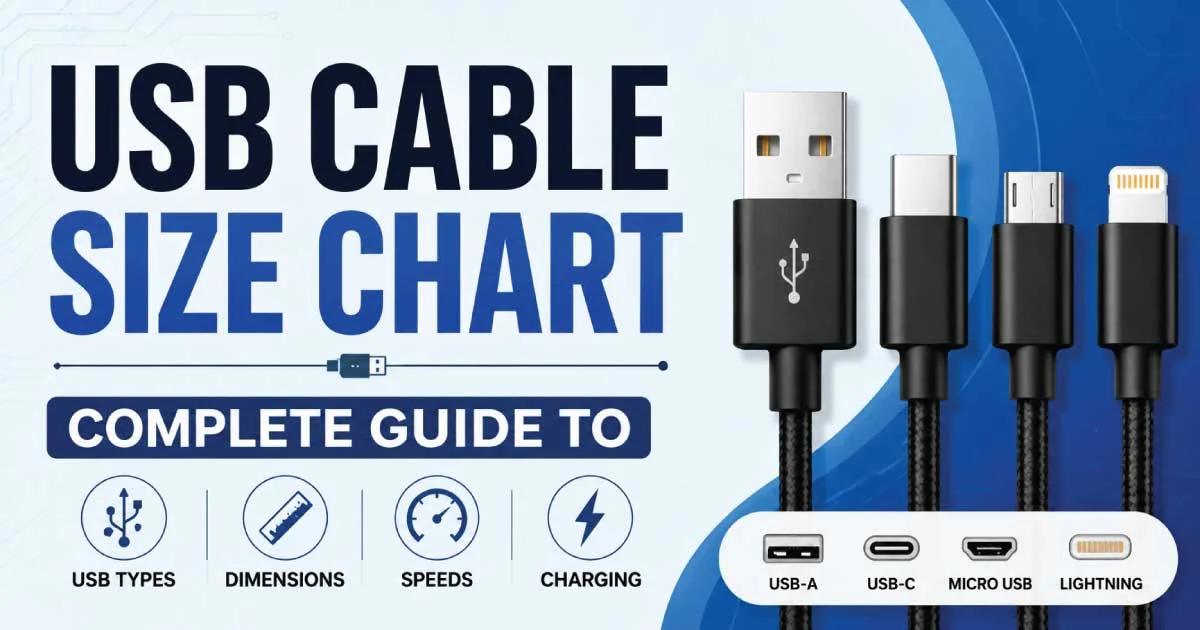
USB Cable Size Chart: Find the Right USB Cable Size

A USB cable size chart is a reference guide that helps users identify different USB connector types, cable dimensions, transfer speeds, charging capabilities, and compatibility.

Since USB standards have evolved significantly over the years, understanding cable sizes prevents purchasing the wrong cable and ensures devices perform at their maximum potential.

Whether you are charging a smartphone, transferring files, or connecting peripherals, a USB cable size chart simplifies the selection process by comparing every major USB connector in one place.


Why Understanding USB Cable Sizes Matters

USB cables may appear similar, but they differ in connector shape, supported speed, power delivery, and intended devices. Using the correct cable improves charging efficiency, ensures stable data transfer, and extends the lifespan of connected devices. Businesses, IT professionals, and everyday consumers benefit from understanding cable specifications before making a purchase.

Some important reasons include:

  • Faster charging performance
  • Higher data transfer rates
  • Better compatibility
  • Reduced device damage
  • Future-proof purchasing decisions

USB Cable Size Chart Overview

The following table summarizes the most common USB connector types and their primary characteristics.
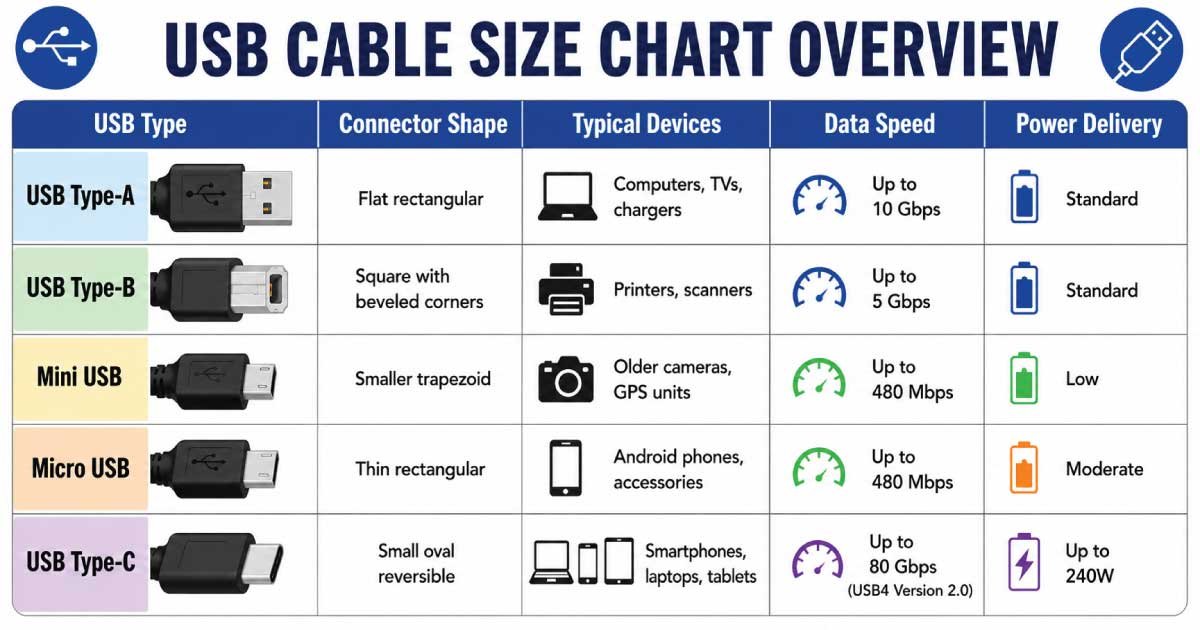
USB Cable Size Chart

USB Type Connector Shape Typical Devices Data Speed Power Delivery
USB Type-A Flat rectangular Computers, TVs, chargers Up to 10 Gbps Standard
USB Type-B Square with beveled corners Printers, scanners Up to 5 Gbps Standard
Mini USB Smaller trapezoid Older cameras, GPS units Up to 480 Mbps Low
Micro USB Thin rectangular Android phones, accessories Up to 480 Mbps Moderate
USB Type-C Small oval reversible Smartphones, laptops, tablets Up to 80 Gbps (USB4 Version 2.0) Up to 240W

USB cable size chart pdf

The USB Cable Size Chart Overview helps you compare the most common USB connector types, their shapes, compatible devices, data transfer speeds, and power delivery capabilities. Whether you need a cable for charging, file transfers, or connecting peripherals, this chart makes it easy to choose the right USB cable for your needs.

USB_Cable_Size_Chart_Overview


USB Type-A Cable

USB Type-A is the most recognized USB connector worldwide. Introduced with the original USB standard, it remains common on desktop computers, laptops, gaming consoles, televisions, and charging adapters. Although newer connectors are replacing it gradually, millions of devices still depend on USB-A for reliable connectivity.

USB Type-A Specifications

  • Rectangular connector
  • Non-reversible design
  • Supports USB 2.0, USB 3.0, and USB 3.2
  • Common in desktop computers
  • Widely available worldwide

USB Type-B Cable

USB Type-B connectors are primarily designed for larger peripherals rather than portable electronics. They commonly appear on printers, scanners, external hard drives, and specialized industrial equipment. Their square-like shape minimizes accidental insertion mistakes while providing a secure connection during extended use.

USB Type-B Features

  • Square connector shape
  • Used mainly for printers
  • Reliable wired connection
  • Supports USB 2.0 and USB 3.x
  • Less common in consumer electronics

Mini USB Cable

Mini USB was once the preferred connector for digital cameras, MP3 players, and handheld GPS devices. Although largely replaced by Micro USB and USB-C, older electronics continue using Mini USB cables, making them relevant for legacy device owners and repair technicians.

Mini USB Characteristics

  • Smaller than USB Type-B
  • Five-pin connector
  • Supports USB 2.0 speeds
  • Common in older portable devices
  • Becoming increasingly obsolete

Micro USB Cable

Micro USB became the industry standard for Android smartphones during the 2010s. It offered a thinner connector than Mini USB while improving durability and compatibility. Despite USB-C replacing it on newer devices, Micro USB remains widely used for affordable electronics and accessories.

Advantages of Micro USB

  • Compact connector
  • Affordable replacement cables
  • Universal support on older Android devices
  • Suitable for Bluetooth speakers
  • Frequently used with power banks

USB Type-C Cable

USB Type-C represents the latest generation of USB connectivity. Its reversible connector, exceptional transfer speeds, and advanced power delivery capabilities make it the preferred choice for modern laptops, smartphones, tablets, gaming devices, monitors, and professional equipment across multiple industries.

Benefits of USB Type-C

  • Reversible connector
  • Faster charging
  • High-speed data transfer
  • Video output support
  • Universal compatibility across modern devices

USB Connector Dimensions

Although USB connectors differ slightly between manufacturers, standardized dimensions help ensure compatibility across millions of devices. Knowing approximate connector sizes helps users visually identify cables without relying solely on product descriptions or packaging information.

Connector Approximate Width Approximate Height
USB-A 12 mm 4.5 mm
USB-B 11 mm 10 mm
Mini USB 7 mm 3 mm
Micro USB 6.85 mm 1.8 mm
USB-C 8.4 mm 2.6 mm

USB Data Transfer Speed Comparison

Each USB generation significantly improves performance over previous versions. Faster cables reduce waiting time when transferring large files, backing up data, or connecting external storage devices. However, actual speeds also depend on device compatibility and cable quality.

USB Standard Maximum Speed
USB 1.1 12 Mbps
USB 2.0 480 Mbps
USB 3.0 5 Gbps
USB 3.1 10 Gbps
USB 3.2 20 Gbps
USB4 Up to 40 Gbps
USB4 Version 2.0 Up to 80 Gbps

Charging Capabilities by USB Cable Type

Charging performance varies depending on cable quality, connector type, and supported USB standards. Modern USB-C cables provide dramatically higher wattage compared to previous generations, making them suitable for smartphones, tablets, gaming consoles, and high-performance laptops.

Cable Type Typical Charging Output
USB-A 2.5W–12W
Micro USB Up to 15W
USB-C Standard Up to 100W
USB-C Extended Power Range Up to 240W

How to Identify the Correct USB Cable

Selecting the right USB cable becomes easier by examining the connector shape, checking device specifications, and confirming supported charging or data standards. A quick comparison prevents compatibility issues while ensuring users receive the fastest speeds their devices can support.

Consider these factors before purchasing:

  • Connector type
  • Cable length
  • Charging wattage
  • Data transfer speed
  • Device compatibility
  • Build quality
  • Certification standards

Common Applications of Different USB Cable Sizes

Different USB connectors serve different industries and devices. While USB-C dominates new technology, older USB formats remain important for legacy hardware, office equipment, and specialized electronics. Understanding these applications helps buyers choose the appropriate cable for every situation.

Common uses include:

  • Smartphones
  • Tablets
  • Digital cameras
  • External SSDs
  • Gaming consoles
  • Desktop computers
  • Laptops
  • Printers
  • Barcode scanners
  • Medical equipment

Choosing the Best USB Cable for Your Needs

The ideal USB cable depends on your device, charging requirements, transfer speed expectations, and future compatibility. USB-C has become the preferred choice for most new electronics because it supports fast charging, high-speed data transfer, and video output through a single compact connector. However, USB-A, Micro USB, and Type-B cables remain essential for many existing devices, making a reliable USB cable size chart an indispensable buying guide.

USB Cable Length Size Chart

USB cables are available in multiple lengths to accommodate different environments and applications. While shorter cables generally provide better charging efficiency and signal integrity, longer cables offer greater flexibility for home, office, and industrial use. Selecting the correct cable length improves convenience without sacrificing performance.

Cable Length Measurement Best For
0.25 m 10 inches Power banks, portable chargers
0.5 m 1.6 feet Laptop desks
1 m 3.3 feet Everyday charging
1.5 m 5 feet Bedrooms, offices
2 m 6.6 feet Living rooms
3 m 10 feet Extended reach
5 m 16.4 feet Specialized installations

How Cable Length Affects Charging Performance

Cable length directly impacts charging efficiency because electrical resistance increases as cables become longer. Shorter cables deliver power more effectively, while excessively long or low-quality cables may reduce charging speed and cause voltage drops. Choosing a certified cable ensures reliable performance regardless of its length.

Important considerations include:

  • Lower resistance in shorter cables
  • Faster charging speeds
  • Reduced voltage loss
  • Better overall efficiency
  • Improved long-term durability

USB Cable Versions Explained

USB technology has evolved through multiple generations, each offering improvements in speed, bandwidth, and power delivery. Although connector shapes may look identical, different versions support vastly different performance levels. Understanding USB versions helps users purchase cables that match their devices’ capabilities.

USB 2.0

USB 2.0 became one of the most successful interface standards in history due to its affordability and broad compatibility. It supports data transfer speeds of up to 480 Mbps and remains suitable for keyboards, mice, printers, flash drives, and many everyday accessories where ultra-fast transfers are unnecessary.

USB 3.0

USB 3.0 introduced SuperSpeed technology, increasing transfer rates to 5 Gbps while improving power efficiency. Its distinctive blue-colored Type-A connector made identification easier, and it quickly became the preferred standard for external hard drives, SSDs, and high-capacity storage devices.

USB 3.1

USB 3.1 doubled maximum transfer speeds to 10 Gbps while enhancing charging capabilities. It supports larger files, smoother multimedia transfers, and faster backups. Many premium laptops and external storage devices adopted USB 3.1 before USB-C became the universal connector standard.

USB 3.2

USB 3.2 significantly boosted bandwidth by utilizing multiple data lanes, reaching speeds up to 20 Gbps. It is particularly beneficial for professional photographers, video editors, and businesses transferring massive datasets between computers and external storage devices on a regular basis.

USB4

USB4 represents one of the most advanced USB standards available today. Built upon Thunderbolt technology, it combines extremely fast data transfer, high-resolution video output, and robust power delivery into a single versatile interface suitable for modern computing environments.


USB Cable Color Coding

Some USB cables use color coding to indicate their supported standards or internal connector type. While colors are not universal across every manufacturer, they often provide a quick visual reference when identifying cable capabilities.

Color Common Meaning
Black USB 2.0
White USB 1.x or USB 2.0
Blue USB 3.0
Teal USB 3.1
Red Fast charging or always-on USB
Yellow High-power charging port
Orange Dedicated charging connection

USB-C vs Micro USB Size Comparison

USB-C has largely replaced Micro USB because of its reversible connector, faster charging, and dramatically improved data transfer speeds. While Micro USB still serves millions of legacy devices, USB-C offers greater convenience and future compatibility for consumers and businesses alike.

Feature USB-C Micro USB
Reversible Yes No
Charging Speed Up to 240W Up to 15W
Data Speed Up to 80 Gbps Up to 480 Mbps
Durability Excellent Good
Modern Device Support Very High Limited

USB-A vs USB-C Comparison

USB-A and USB-C often coexist on modern devices, but they serve different purposes. USB-A remains widely used on computers and legacy accessories, whereas USB-C is designed to be the universal connector for charging, data transfer, and video output.

Feature USB-A USB-C
Connector Design Rectangular Oval
Reversible No Yes
Charging Capacity Limited Up to 240W
Data Speed Up to 10 Gbps Up to 80 Gbps
Video Support Limited Yes

Common USB Cable Mistakes to Avoid

Many users purchase USB cables based solely on connector appearance, overlooking important technical specifications. This often leads to slower charging, reduced transfer speeds, or incompatibility with devices. Understanding product labels and certifications helps avoid these common mistakes.

Avoid the following:

  • Buying unsupported connector types
  • Ignoring charging wattage
  • Choosing low-quality cables
  • Purchasing excessively long cables unnecessarily
  • Assuming all USB-C cables perform identically
  • Overlooking data transfer specifications
  • Using damaged cables

Tips for Choosing the Right USB Cable

Selecting a high-quality USB cable involves more than matching connector shapes. Buyers should consider charging requirements, transfer speeds, cable construction, and intended use to maximize performance while ensuring long-term reliability.

Helpful tips include:

  • Verify device compatibility
  • Choose certified products
  • Match cable speed with device capability
  • Purchase braided cables for durability
  • Consider cable length carefully
  • Select trusted manufacturers
  • Read technical specifications before buying

How to Maintain USB Cables

Proper cable care significantly extends the lifespan of USB accessories. Frequent bending, pulling, and improper storage can damage internal wiring, reducing charging efficiency or causing complete cable failure. A few simple maintenance habits help protect your investment.

Best maintenance practices:

  • Avoid tight bends
  • Disconnect by gripping the connector
  • Keep connectors clean
  • Store cables loosely
  • Protect from moisture
  • Replace frayed cables immediately

Conclusion

A comprehensive USB cable size chart simplifies the process of choosing the right cable by comparing connector dimensions, charging capabilities, data transfer speeds, and device compatibility. Instead of relying on appearance alone, users can quickly identify the correct cable type for their smartphones, laptops, tablets, peripherals, and other electronic devices.

USB cables have evolved significantly over the years, from legacy USB-A and Micro USB connectors to the versatile and high-performance USB-C standard. Each connector type is designed for specific devices and applications, making it important to understand the differences before purchasing a replacement or upgrade.

Beyond connector size, factors such as USB version, power delivery (PD) support, charging wattage, and data transfer speed play a major role in overall performance. Selecting the right cable helps maximize charging efficiency, enables faster file transfers, and ensures reliable communication between connected devices.

Using a detailed USB cable size chart also helps prevent compatibility issues and unnecessary expenses. Whether you are upgrading a workstation, replacing a worn-out charging cable, connecting external storage devices, or equipping a business with dependable connectivity solutions, choosing the correct cable improves both convenience and productivity.

By understanding USB cable sizes, connector types, and technical specifications, you can confidently select the best cable for your needs. A reliable USB cable size chart supports informed purchasing decisions, enhances device performance, and provides a future-ready solution as USB technology continues to evolve.

Also Read:  How to Measure Wire Size – Complete Guide


FAQs:

Leave a Comment